A buyer’s guide for utility-scale teams

How to choose utility-scale solar and storage software

A buyer's guide to the software that takes a utility-scale site from screening to a pre-construction-ready design, for solar, for battery storage, and for hybrid plants. What each category does, which tools sit where, and what to ask before you sign.

Solar and storage design software turns a real project site into a plant layout, an energy yield estimate, an electrical design and a cost model, for PV, for standalone batteries, and for the two together, so you can decide whether to build before you commit engineering hours.

Published by Enverus, which sells in several of the categories below. Where that matters, the guide says so.

A buyer's guide to solar software
Start here

Start with the segment you build in

Project size drives the software decision more than any feature does. A tool built for rooftops won't lay out a 200 MW plant, and a platform built for utility-scale is overbuilt for a house.

Residential

<10kW per rooftop

Residential software is built around the sale as much as the design: roof layout, shading, a production estimate, a proposal a homeowner signs. If that's your work, this guide isn't for you, and the tools that serve it are a different set from the ones below.

  • Who it's for: Installers and residential sales teams
  • What you produce: Roof layout, shading, a production estimate, a homeowner proposal
  • The hard part: Turning site visits into signed proposals, at volume

Commercial & Industrial

<1MW per site

Commercial & Industrial (C&I) sits between the two. Rooftop and small ground arrays, permit-ready drawings, string and inverter configuration. Several tools built for this segment publish a hard design cap, the lowest at 1.25 MW DC, which marks where it ends more plainly than any argument could.

  • Who it's for: Contractors and EPCs working on buildings
  • What you produce: Permit-ready drawings, string and inverter configuration
  • The hard part: Roof constraints, and staying inside the published caps

Utility-Scale

>1MW per plant

Above a megawatt the job changes shape. You're screening land you don't own yet, laying out power stations, roads and battery containers, sizing medium-voltage cable, moving earth, and building a cost model a financier will read. That's what the rest of this guide covers, for PV, for standalone storage, and for hybrid plants.

  • Who it's for: Developers, IPPs, EPCs, utilities and engineering consultancies
  • What you produce: Plant layout, electrical design, energy yield, earthworks and a cost model a financier will read
  • The hard part: Terrain, grid connection, and doing all of it at portfolio scale
Utility-scale solar design and engineering software stacks

Four ways utility-scale teams get this done

Almost every team lands in one of four stacks. Each buys you something real and costs you something real.

General-purpose tools you already own

General-purpose tools you already own

Excel, AutoCAD, Google Earth, QGIS, and a spreadsheet somebody built five years ago. Autodesk Civil 3D belongs here too: it's excellent at grading, surfaces and cut-and-fill volumes, and Autodesk publishes nothing about PV plant design in it.

It's the default across most of the teams we talk to, and nothing here matches its editing freedom. What it costs is throughput: every scenario is hand-built, so you compare two or three options where you could compare thirty, and the go or no-go call rests on the ones there was time to draw.

CAD with solar plugins

CAD with solar plugins

The same AutoCAD, with solar automation on top. PVcase Ground Mount is the best-known: it automates utility-scale layout against real terrain, routes DC and AC collection, generates single-line diagrams, and exports a shading scene to PVsyst. SunDAT does something similar inside SketchUp rather than AutoCAD.

You keep CAD-native editing and gain real automation. You also keep the host licence, because the plugin needs one, and you stay in that environment for everything the plugin doesn't cover.

Specialised PV platforms

Specialised PV platforms

Platforms built for solar rather than adapted to it. RatedPower, Terabase and DNV's SolarFarmer for utility-scale; Helioscope, Aurora and PV*SOL for rooftop and C&I; Enverus PRISM, Glint Solar and PVcase Prospect for early screening and prospection. You get a shorter path from a site to a set of documents, and you give up some of the manual granularity CAD gives you.

Software you build yourself

Software you build yourself

Large developers and utilities sometimes build their own. It fits your standards exactly, because you wrote them. The cost is that you own it forever, and total cost of ownership includes the maintenance nobody budgets for.

Which tool covers which stage

Read it as a map of where each tool sits, not a scorecard. Most utility-scale teams run two or three of these together, and the useful question is where the seams fall.

Group 1: Utility-scale design platforms

These turn a site into a buildable design. If you are above 1 MW and the layout, the electrical and the cost model all have to come out of one run, this is the table to read.

CapabilityEnverus RatedPowerPVcase Ground MountTerabaseSolarFarmerSunDAT
Runs in
Cloud
AutoCAD, Desktop
Cloud
Desktop
SketchUp, Desktop
Grid and interconnection
interconnection design, not queue data
AC collection, not grid studies
AC collection and export limits
Automated plant layout
Terrain following trackers
GCR optimisation on rough terrain
Manual layout editing
MV cabling and SLDs
cables and transformers, no SLDs
wire schedules, no published SLDs
Energy yield and shading
simplified and 3D ray-traced
via PVcase Yield
via SAM
BESS layout and sizing
containers, PCS, distances
Hybrid AC- and DC-coupled
Dispatch, arbitrage, LCOS
Civil, terrain, cut and fill
slope analysis, terrain mesh
terrain and shading, no grading
slope analysis and pile lengths
CAPEX, LCOE, IRR
bill of materials, not financials
Documentation output
400+ pages, editable
BoM, layout info, SHP
.csv, JSON and PVCollada export

Group 2. Prospecting and site data

Everything before the design. These find the land, test whether it is buildable and tell you what the grid will accept, then hand off. None of them produces a plant design.

CapabilityEnverus PRISMPVcase ProspectGlint SolarSolargis
Site screening and GIS
parcels, substations, transmission, power plants
parcels, constraints, zoning
Buildable land analysis
customisable buildable acreage
Your own GIS layers
Grid and interconnection
available transfer capability, hands off to Enverus Interconnect
power-flow, queue tracking
Locational pricing
LMP, congestion analytics
historical nodal pricing only
arbitrage, 18 markets
Automated plant layout
hands off to RatedPower
pre-permit
Energy yield
early yield and LCOE estimates
30-min over 15 yrs
ray-traced

Group 3. Energy yield and economics

Where the production number comes from, and what it is worth. Four of these five do nothing else, which is the point of the group.

CapabilityRatedPowerPVsystPVcase YieldSAM (NREL)
Runs in
Cloud
Desktop, Windows
Cloud
Desktop
Automated plant layout
customisable buildable acreage
String sizing and array config
Energy yield and shading
available transfer capability, hands off to Enverus Interconnect
power-flow, queue tracking
Bifacial and trackers
LMP, congestion analytics
historical nodal pricing only
arbitrage, 18 markets
Sub-hourly simulation
hands off to RatedPower
pre-permit
Losses and grid modelling
early yield and LCOE estimates
30-min over 15 yrs
ray-traced
Storage
storage modelling, no BESS layout

Group 4. Rooftop and C&I

Built for buildings, not fields. Most publish a hard design cap, which makes this the clearest boundary in the category. If your projects cross those numbers, you have outgrown this table.

CapabilityHelioscopeAurora SolarPV*SOLPVcase Roof Mount
Runs in
Cloud
Cloud
Desktop, Windows
Desktop, AutoCAD
Automated plant layout
auto-fill within the drawn area
String sizing
Cabling
basic single-line diagram only
SLD editor, residential and C&I
circuit diagrams with safety devices
Energy yield and shading
NREL validated
3D shading
shading analysis, energy simulation
Storage
AC, DC and hybrid

Group 5. General-purpose tooling

No table, because the answer is short. Spreadsheets, AutoCAD, Google Earth and QGIS cover manual layout editing and manual documentation, and nothing else on these rows. Autodesk Civil 3D adds grading, terrain and cut-and-fill, which it does better than anything here, and Autodesk publishes no PV layout capability in it.

The tools you'll hear named

One entry each, from published material. Each links to a fuller comparison.

PVsyst

The yield standard, and not a layout tool. It imports a 3D scene rather than drawing a plant, and it's what you run for the bankable P50, P90 and P99 a lender expects. No site screening, no MV cabling, no civil works, and no native .dwg import.

RatedPower vs PVsyst
PVsyst Alternative

PVcase

Four products, not one. Ground Mount and Roof Mount automate layout inside AutoCAD and need a live licence. Prospect covers land and grid, and Yield is a cloud energy model with ray tracing. Deep CAD control, with the CAD dependency that comes with it.

RatedPower vs PVcase
PVcase Alternative

Helioscope

Rooftop and C&I, with the boundary published rather than argued: design caps of 1.25, 5 and 30 MW DC by tier, and ten projects per licence each month. Shading is module-level and hourly, and NREL validated the shade reports independently.

RatedPower vs Helioscope
Helioscope Alternative

Glint

Built for the front of the funnel. Land, roads, exclusions and grid connections on a map, pre-permit layouts, and fifteen years of half-hourly yield across PV, storage and hybrid in eighteen markets, exporting straight into PVsyst for the bankable run.

RatedPower vs Glint
Glint Alternatives

Terabase

The widest published span here, and it reaches past us in both directions. Yield modelling on projects over 1 GW with full ray tracing at one end, construction management and field robotics at the other.

RatedPower vs Terabase

Eight questions to ask every PV, BESS or renewable software vendor

Automated placement of modules, structures, roads and power stations against real terrain and real exclusions is the difference between saving a week and saving an afternoon.

Ask whether the tool reads your survey data, simulates earthworks against it, and returns cut and fill volumes you can cost.

Placing power stations and combiner boxes is one capability. Sizing cables, protection devices and transformers to a local standard is another.

Ask what the model does, and ask for the comparison against the tool your lender already trusts.

If CAPEX, BoM and LCOE live in a separate spreadsheet, every design change means re-keying.

Answers vary more here than anywhere else on the list. Some tools automate the layout, several publish a command line or an SDK, Enverus publishes an agent interface, and some leave the work with you.

Per-seat licensing prices a tool for the engineer who already has it, not the team that could use it. Ask how the number moves when you add three people and thirty projects.

Ask whether it places containers and power-conversion systems to your manufacturer's dimensions, sizes cable and reactive power to your grid code, and models charge and discharge against real prices. Plenty of tools tick a BESS box and do only one of the three.

Take the checklist into your next vendor call

The eight questions above, plus the full feature comparison, in a PDF you can bring to a meeting.

Where RatedPower fits

Every guide published by a vendor owes its reader one plain statement of where that vendor sits. Ours is this: we fit utility-scale teams doing prospection, feasibility and pre-construction design at volume. If your work is commercial, industrial or residential rooftop, other tools on this page serve you better. Here it is in three parts.

Icon

The span we cover

Feasibility through pre-construction detailed layout, for PV, standalone storage and hybrids. A real site in; a layout, an electrical design, a 3D ray-traced yield, a CAPEX model and 400-plus editable documents out, in one pass.

Icon

What one run produces

One run returns the layout placed against your terrain and exclusions, the electrical design sized to your standard, and the techno-economics built from that same design. Change one parameter and all three move together.

Icon

Where we stop

The energy yield reconciles with PVsyst. The deepest manual civil and cabling work belongs to CAD tools, and our answer is a .dwg round-trip. Construction is outside our span entirely.

Power Analyst PV design optimization
AI Agentic Solar and Storage Platform

AI Power Analyst runs the iterations for you

Engineers tell us the same thing about optimization: the software tests the design you propose, but it will not tell you which design is best. So the search happens by hand, one run at a time, until the calendar runs out. Enverus ONE Power Analyst closes that loop.

  • Describe the goal, not the parameters
    State what the project has to hit, in plain language. Power Analyst operates the simulation, design-space and CAPEX engines directly and works toward a design that meets it, instead of you driving each parameter yourself.
  • Compare at a scale you would not attempt by hand
    Vary pitch, DC/AC ratio, module and inverter combinations together, then read the results side by side against the KPIs you care about. Every option is backed by a full engineering simulation, not an approximation.
  • Nothing is saved or executed without your confirmation
    Power Analyst does not commit changes on its own. You review what it proposes and confirm before anything is written to your project.

What teams report after they switch to Enverus

Aukera Energy: Modelling BESS dispatch with confidence across hybrid PV projects

«One of the key features we're using is the software's capacity to simulate dispatching in a hybrid project with PV and BESS: you can upload your own electricity prices and simulate with your own data, which helps a lot to validate and optimise our base designs.»

Eduardo GonzalezHead of Solar Engineering at Aukera Energy

Elsewedy Electric: from weeks of engineering work to smarter designs in hours

«The 3D Energy tool is really useful when you're dealing with tough terrains — it shows you exactly which modules are most affected by shading, and gives you the freedom to explore different installation approaches to mitigate it.»

Ahmad AlkhatibTechnical Office Senior Engineer at Elsewedy Electric

SolarFarm Feasibility: Building a feasibility business on rapid design iteration with RatedPower

«Using traditional methods, I often found that it would take a lot of time, and a simple change could ripple and really take time and resources away. I built my business on the ability to give people the chance to look at a lot of different versions very quickly and really find the best solution for that site.»

Jake SteelePrincipal Consultant at SolarFarm Feasibility

Mulilo: Slashing layout generation time while strengthening stakeholder alignment

«Our turnarounds are a lot quicker now. The turnaround time on everything is maybe 10% of what it was before. Layouts that used to take a couple of hours can now be done in just a few minutes with our templates.»

Johan Janse van RensburgSolar PV Engineer at Mulilo

Res Group: Enhancing project delivery by connecting RatedPower with AutoCAD and PVsyst©

«When manually doing a preliminary site layout in AutoCAD, it can take considerable time and resources. Depending on the size of the site, it can easily take one or two days just for one single scenario. RatedPower’s ability to export layouts as DWG files ensures smooth integration into AutoCAD, helping reduce this workload and speed up design iterations.»

Isabelle Gezer Renewable Enery Consultant at RES Group

Kiwi Solar: Unlocking flexible layouts and cost insights with RatedPower

«RatedPower is a huge time saver for pumping out multiple designs, cost saving upfront for analysis, and it’s just a user-friendly tool to use.»

Brandon SmithProject Manager & Electrical Engineer at Kiwi Solar

Recurrent Energy: Turning multi-tool workflows into a unified PV+BESS platform

«We have reduced our overall engineering workflow by about 50%, thanks to the platform combining CAPEX estimation, AutoCAD designs, and battery storage simulations. We’ve been able to design several megawatts of storage and it has helped us improve our grid connection applications for stationary BESS projects throughout Europe.»

Nithya Susan VargheseEngineering Manager at Recurrent Energy

Transforming PV development through an integrated optimization approach

«We cut down engineering time on individual project with quite high certainty on the layout and yield, probably by 30 to 40%.»

Philip MannsPreconstruction Team Lead at Engie
Philip Manns

Akuo Energy: Making smarter use of land with Layout Editor

«The new Layout Editor gives us more flexibility to optimize land use, with the option to remove or add structures and align them with parcel borders. It helps us make better use of the total available area of our plant.»

Marwa Jemai Solar Techno Manager at Akuo Energy

Alten: civil design, BESS & Layout Editor flexibility

«Being able to move trackers and adjust them to fencing or restricted areas directly within the Layout Editor gives us much greater agility when creating designs, because we don’t need to export them to other tools to keep working.»

Jorge LozanoProject Engineer at Alten Energías Renovables

Photon: Bringing solar design in-house

«RatedPower is truly a value creator. It allows us to develop projects more efficiently while adding significant value to each opportunity. In Japan, tools like this are still not widely adopted, and much of the solar project development process remains manual.»

Yuko IshiharaManaging Partner & Co-founder at PHOTON CAPITAL LLC

Ekhi: From feasibility checks to confident designs in record time

«One of the most common challenges we face is space constraints. We need to play around with different tilts and pitch, and this used to be quite a long process with several tools. The great thing about RatedPower is that we can simulate many scenarios, varying all these parameters, and have it done in no time. With the Layout Editor, we now see a huge improvement when fine-tuning our plant layouts.»

Paula Mateos / Emma SánchezHead of Project Feasibility at Ekhi / Project Analyst at Ekhi

NRGi: Improving investment decisions with consistent PV design data

“At the last steps, just before financial investment decision, I was still able with RatedPower and the approach that we were using to improve the IRR for the project by 0.2 to 0.5%”

Ulrich BussemasPower Technology Manager at NRGi

Optimizing PV projects and overcoming the limitations of legacy software 

«We have received a highly professional response when we needed support or training from the team. RatedPower helps us optimize our projects and provides us with a significant advantage over our competitors.»

Saad UmerBusiness Development Director, Solar PV at ACWA Power
Saad Umer

Solución Solar: Boosting portfolio growth with integrated solar software

«Today, we have layouts, financial analysis, and generation forecasts—under different exceedance probability scenarios—all in the same tool, just as banks are demanding today.»

José Rodrigo Llarena GreñasCEO at Solución Solar

Venn Energy: Speeding up PV layouts while optimizing resources

«Each simulation gives us detailed energy and financial insights, helping us make informed decisions quickly and efficiently.»

Promit RoyDesign and Commissioning Manager at Venn Energy

Transitioning from 1MW ground-mounted projects to 250MW in 9 months

«RatedPower really helped us eliminate our bottlenecks. It goes beyond other tools because it helps us design not just the low voltage or medium voltage, but also the connection point to the grid.»

Lorik HaxhiuFounder, iRN
Lorik Haxhiu

Hidrosolar: Unlocking 30% more efficiency in solar design with RatedPower

«We were able to be up to 30% more efficient when making estimates for new projects by having a clearer idea for future developments. So, in terms of time, we could save around 20% to 30%»

Diego Armando ZaldivarEnergy Markets Analyst at Hidrosolar

Enhancing Hodson Energy’s streamlined project qualification and PV design

«With Enverus PRISM, we quickly filter opportunities and gain a holistic view of viable projects. Enverus RatedPower automates our design process, turning weeks into minutes»

Shazim ChhapraChief Strategy & Commercial Officer at Hodson Energy
Read More
Shazim Chhapra

Kickstarting efficient project pipelines

«Although every single engineering aspect and decision is reassessed upon further stages of development, having a pre-made set of rules and standards to start from really helps simplify the development process.»

Francesco PolitoEngineering Manager at Queequeg Renewables

Reducing PV layout generation time by up to 95%

«RatedPower allows us to have the capacity to do more strategic front-end early contractor involvement, helping us build projects faster and reducing schedule overrun risk.»

Cris Vincent AlidonEngineering and Construction VP at Aboitiz Power
Cris Vincent Alidon

RatedPower's speed helps us boost our competitive advantage

«Now we can turn around design documents within hours and minutes to stakeholders, landowners, partners or engineers, to get through our regulatory process. This has allowed us to move projects forward faster.»

Megan ParsonsChief of Engineering at Blue Ridge Energy
Megan Parsons

Accelerating solar design from 5GW to 30GW per year

«Before RatedPower, there was a high level of variability, simple land layout to more irregular layouts. Now, we can quickly filter down sites from what is possible to what is realistic.»

Robert WrightSolar and Storage Director at Burns & McDonnell
Read More

Empowering Recurrent Energy from PV design to financial feasibility

«Of all the solutions we evaluated, RatedPower proved to be the most comprehensive, allowing us to generate layouts, one-line diagrams, reports, energy yield forecasts, and CAPEX & LCOE estimates—all in one platform.»

Pedro Luiz de Almeida SilvaProject Engineering Coordinator at Recurrent Energy.

Streamlining BayWa's pre-engineering workload

«We needed software that was easy to handle, fast, and detailed. Now, with RatedPower, our developers can design in half an hour. Using AutoCAD or other tools would take one or two days.»

Mirko SchiezlHead of Engineering at BayWa r.e.
Mirko Schiezl

RatedPower gives us quite a lot of more control over site design than outsourcing it

«It takes just a few days to figure out how much land do we need for a solar project. It used to take two or three months.»

Vann JoinesDirecteur du Développement Commercial
Vann Joines

Empowering solar PV design customization through faster iterations

«In one or two weeks, I became very familiar with the software. I was able to do more iterations on our solar layouts, and we could fill the interconnection requests in no time.» 

Íñigo Sangroniz Solar Development Engineer at Solea Power

Enhancing land assessment efficiency for PV developers

«RatedPower produces a set of documentation to deal with most of the environmental agencies' requirements and for application of grid connection authorization processes.»

Luis Guilherme CastroSolar Development Engineering Manager at Casa Dos Ventos

Competitive positioning in large-scale overseas PV plant bidding

«RatedPower has a solid customer base and good reputation abroad. It delivers required documents in multiple languages for our global bids while adopting international design standards»

Feng YuNew Business Manager, International at POWERCHINA
Feng Yu

I don't need to hire a team of electrical engineers to develop a PV project

There is only a team of three of us doing the design work with RatedPower. We just need some hours —instead of weeks. It's amazing!

Andre FaustoOwner
Andre Fausto

We're reducing assessment from one week to hours

Deployment was fast and easy to use for the development team. We've reduced assessment time from one week to hours.

Rafael GómezPV Manager
Rafael Gómez

Doubling PV project development bandwidth with RatedPower

«Thanks to the new developments created by RatedPower that adapt to our needs, we could double our capacity. The time we used to spend on designing and reviewing designs is now focused on doing more projects.»

Lennin PiñeiroDevelopment Engineer at Celsia
Read More

Centralizing solar development in one app

«We used to use a mix of tools like AutoCAD, spreadsheets and PVsyst. Now with RatedPower, our team can be innovative and explore more possibilities without wasting time, as each design only takes minutes to run.»

Thomas GerstchConstruction, Engineering and Grid Director at Iberdrola
Read More
Iberdrola

Driving efficiency and optimizing resources for more than 50 projects

«RatedPower offers highly personalized customer support. The team has been efficient in solving our doubts and helping us learn how to make the most out of the tool based on our unique needs.»

Antonio VerdugoHead of Technical Office at ABEI Energy
Read More

Increasing accuracy of early-stage assessments while saving time and costs

«RatedPower's energy yields of our PV systems are pretty similar to what we use to have with legacy tools. It also has an excellent ability to launch new features.»

David NazarethDevelopment Manager
David Nazareth

Harnessing RatedPower to carry out invaluable PV equipment analysis

«RatedPower provides us with simplicity and flexibility in our solar projects while requiring fewer resources. Other software options typically demand more resources on our end to complete these calculations.»

Nicolás Fernández-VelillaIngénieur Solutions Système chez Sungrow
Nicolás Fernández

A three-in-one software that saves PNE time and resources

«It's easy to use, even for non-technical users. Now, anyone in our offices can efficiently create their own designs, and our German engineers can manipulate anything in our projects remotely since RatedPower's platform is cloud-based.»

Hugo NavarroHead of Solar Engineering at PNE AG

Get real-life inspiration from energy professionals like you

Check how other development and engineering teams are leveraging software to increase ROI and mitigate risks of their utility-scale solar assets.

All success stories

Questions buyers ask

Almost certainly. Most utility-scale teams run two or three together: something for the land and the grid, something for the design, and a yield simulator for the bankable number. The useful question isn't which tool wins, it's where the seams fall, because every seam is a place somebody re-keys data by hand. Ask what each tool exports and what the next one will import, .dwg, .dxf, PVsyst files, shapefiles, before you buy either.

Not past a point, and two vendors publish exactly where that point is: design caps of 1.25, 5 and 30 MW DC by tier on one product, and 7,500 mounted modules on another. Below those numbers the rooftop and C&I tools are fast and well liked. Above them the job needs site screening, MV cabling, civil works and techno-economics, and the capped tools publish none of it.

A design tool produces a plant: layout, electrical, civil works, documents. A yield simulator produces a number: how much that plant will generate, and with what uncertainty. Some tools do one, a few do both, and several do neither and are really land or economics tools wearing a similar label. Group them by what they're for before you compare features, because a capability comparison across categories tells you nothing.

Ask three things, and ask where each answer is published. What the model actually does: ray tracing or not, hourly or sub-hourly, how shading is handled and whether it's inside the calculation or applied afterwards as a derate. Whether the methodology is documented in public. And whether it's been validated against something, another model or real production data from a real plant, with the error stated rather than described.

Sometimes, and it depends which part you mean. Storage splits into three jobs that vendors cover unevenly: placing containers and power-conversion systems, sizing cable and reactive power to a grid code, and modelling charge and discharge against real prices. Some tools do all three, several publish nothing at all, and two of the strongest storage models here can't draw a plant. Work out which of the three you actually need.

What solar software covers, and why LCOE moves

Solar and storage design software takes a real site and produces what a project needs before construction: a plant layout, an electrical design, an energy yield estimate, a cost model, and the drawings that travel with them. For a battery project the outputs are the same shape, with container and power-conversion layouts in place of module rows and a dispatch model in place of a yield curve.

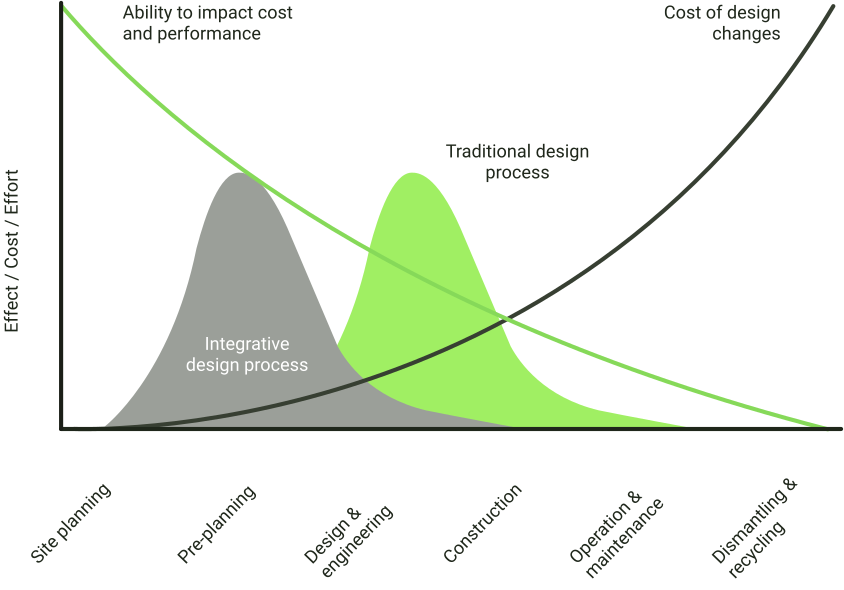
It changes project economics because of a curve Patrick MacLeamy described in 2004. The earliest decisions are the cheapest to change and the most expensive to get wrong. A tilt angle, a row pitch or a DC to AC ratio chosen in week one sets the LCOE the project carries for twenty-five years, and once detailed engineering starts, changing it costs real money. Software moves effort earlier, where it's still cheap, and lets you compare more options before anything is committed.

That's the argument for the category. The rest of this page is about which tool does it for the kind of project you build.

Ready to see what one pass looks like on your site?

Walk through the platform at your own pace, or book a session where we build one of your real sites live.